Chapter 7
See your family member's medicines

What it is for
The Medicines section lists what your family member is taking, and shows whether today's doses have been given. It is for your information. It does not change anything.
The list is for your information only. For any question about a medicine, ask the centre. Never change or stop a medicine because of what you read here.
Steps: look at today's medicines
- Tap My client.
- Tap Medicines.
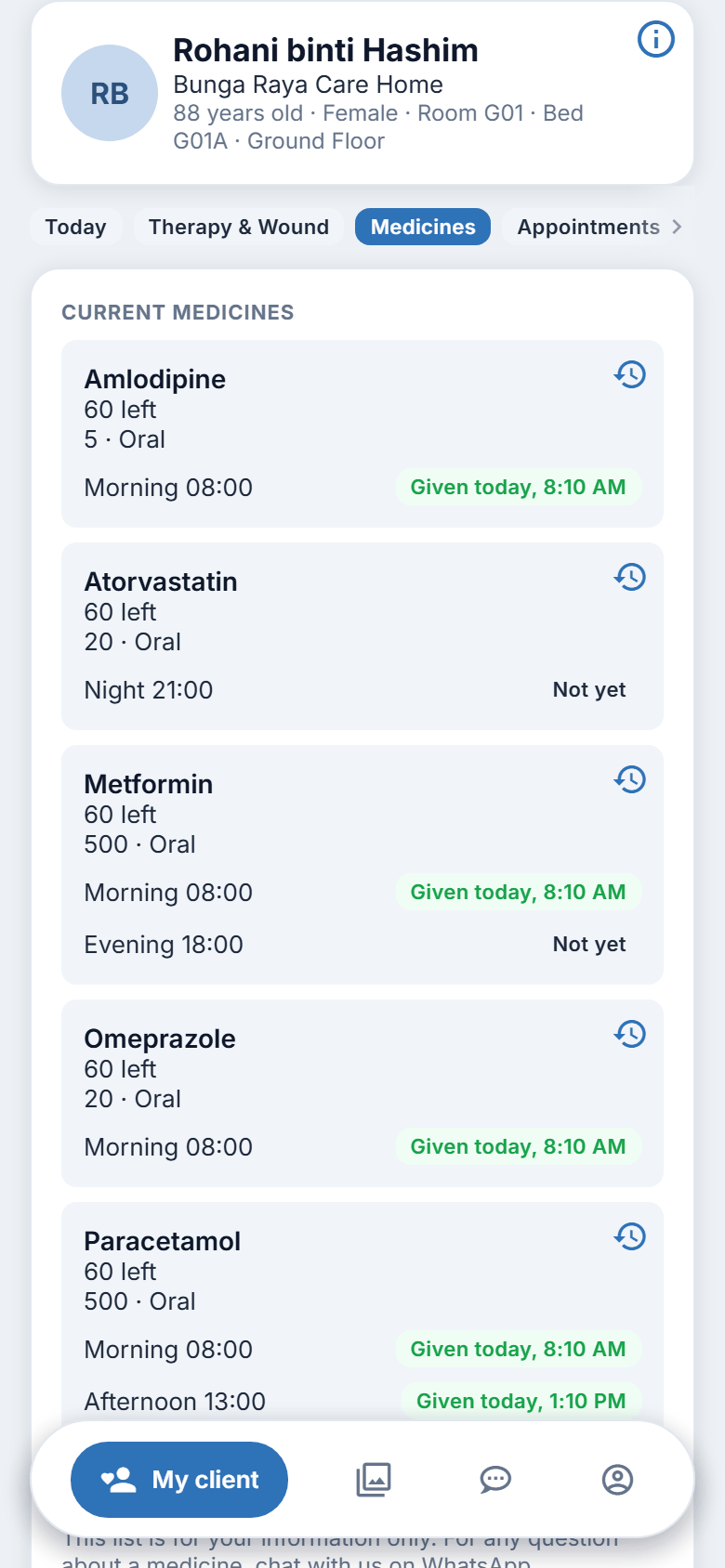
- Under CURRENT MEDICINES, each medicine shows its name, dose, how it is given and how often, in words: "Once daily", "Twice daily", "Three times daily", "At night", "Every other day", "Weekly", "As needed" or "Immediately".
- Under each medicine are its times of day: Morning, Afternoon, Evening, Night.
- Beside each time you may see:
- Given (with the time, if recorded): the dose has been given today;
- Not yet: the time has not come, or the dose has not been recorded yet;
- Not given. Please ask the centre.: the dose was not given. Ask the centre why.
- If the centre records how much is left, the medicine also shows "12 left", for example.
Steps: see the doses over time
- On a medicine, tap the small clock icon at the top right.
- A sheet lists the days and the doses on each, newest first.
- Tap Show more for older days. Close the sheet when you have finished.
Steps: see stopped medicines
- At the bottom of the Medicines card, turn on Show stopped medicines.
- A STOPPED MEDICINES list opens. Each shows its name, dose and how often, and when it stopped, with one word for the reason: Stopped, On hold, Omitted or Finished.
- If there are none, the page says "No stopped medicines."
- Turn the switch off to hide them.
Figure 7.1. Reading the medicines list.
If your family member has left the centre
The heading becomes Medicines on record and a note says these are the last medicines on record and are no longer being given. Doses and stock are not shown.
On the website
The same section, switch and clock icons.
Good to know
- You cannot order, change or stop a medicine here.
- If there is no list, it reads "No medicines are listed at the moment."