Chapter 9
See appointments and arrange a visit

What it is for
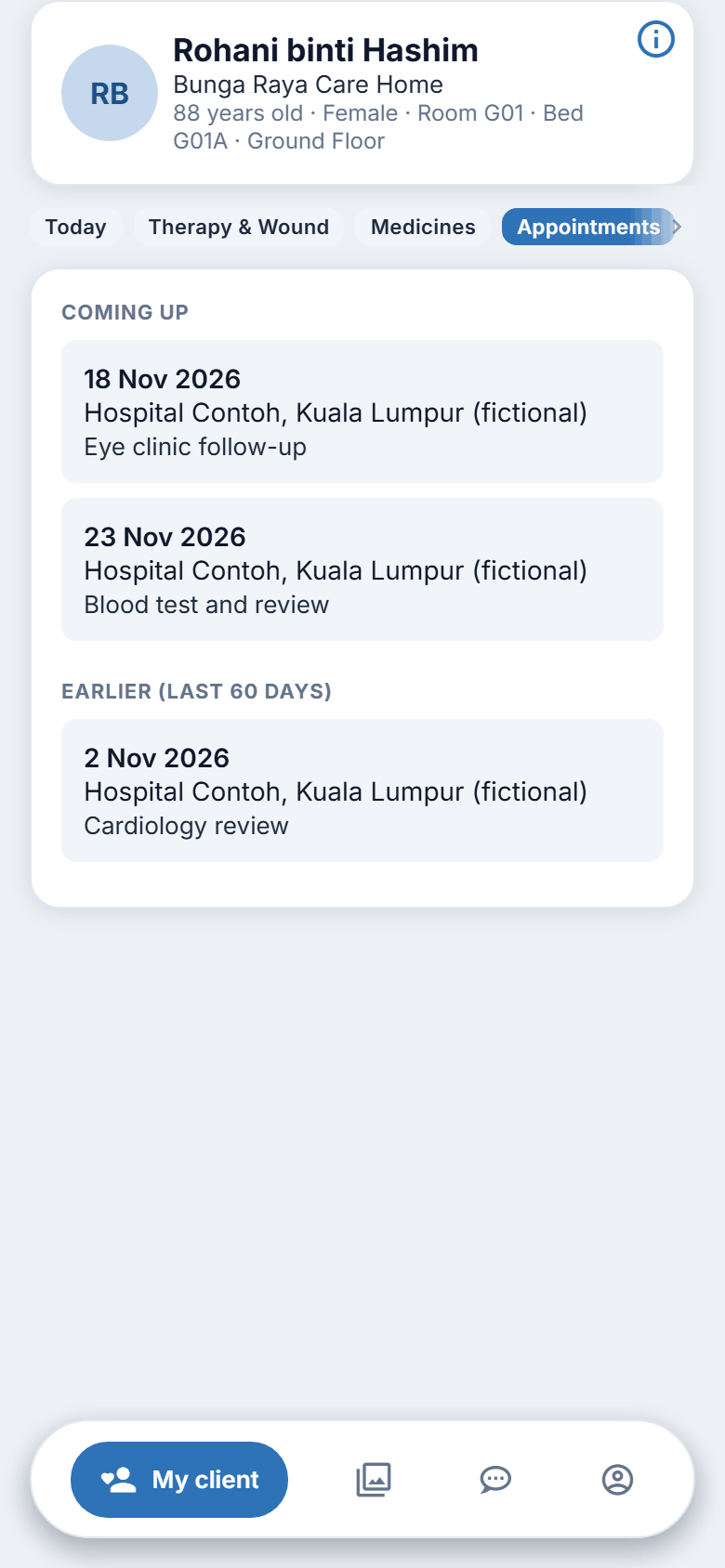
The Appointments section shows your family member's appointments: a doctor's visit, a clinic, a scan. You can see when and where. It is for reading only.
Steps: see appointments
- Tap My client.
- Tap Appointments.
- Under COMING UP, each appointment shows the day and time, the place and the reason.
- If a staff member goes with your family member, the line "A staff member goes with them" appears.
- A cancelled appointment has a Cancelled label.
- Under EARLIER (LAST 60 DAYS) you can see appointments that have passed.
If nothing is booked, the page says "No appointments coming up."
Arranging a visit today
The way to arrange a visit or an outing is by message or phone. The app has no visit request form. To arrange one:
- Tap the Inbox tab.
- Tap WhatsApp the centre.
- Write your family member's name, the day and time you would like, and how many people are coming.
- Wait for the centre to confirm in WhatsApp.
You can also phone the centre. See chapter 16.
Figure 9.1. Seeing appointments and arranging a visit.
Notices about appointments
In Notification Preferences there is a category called Appointments ("Booking confirmations and reminders"). You can turn its phone and email notices on or off. See chapter 14.
On the website
The same section and the same labels.
Good to know
- You cannot book, move or cancel a medical appointment here. Ask the centre. The Inbox message above is for visiting, not for medical appointments.
- If something looks wrong, such as a time you were not told about, ask the centre.