Accounting modules
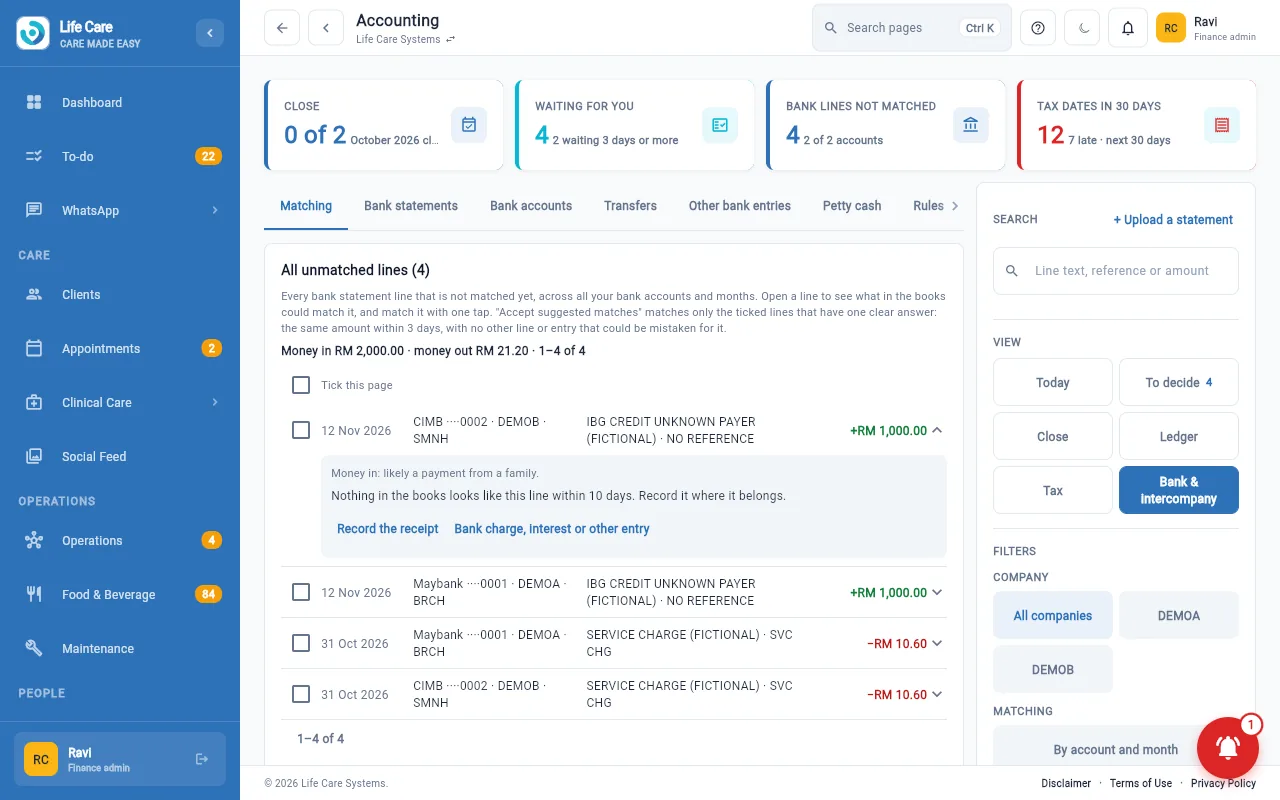
Bank matching where a month is reconciled only when it is
Upload your bank statements, match each line to the books, and close the month only when nothing is missing.
The problem
A zero difference can hide missing lines
A month can show no difference and still have statement lines that never reached the books. Those lines then stay locked out, and the books stay short.
How it works
What Life Care Systems does
The rule
- Mark month reconciled is disabled while any statement line in the month is not in the books
- The server refuses it too, so changing the screen does not get round it
- Items in the books but not yet on the statement (for example cheques not yet cashed) are still allowed
- The month-end checklist counts the bank step as done only when no line is unmatched
Everyday matching
- Any finance administrator can upload bank statements
- Match a line to an invoice, bill or payment, or record a transfer
- Click a month on the statements grid to see, add or replace that month's files
- After one month is reconciled, Matching moves to the next
- Mark a real but unused account dormant so it stops appearing
Several accounts, several centres
- Each centre uses the bank accounts of its own company
- Payments between group companies are settled against their invoices
Good to know
Limits and who it is for
- Statements and matching are part of the accounting modules. The Plans page shows which plan includes them.
- Life Care Systems prepares your figures. Your accountant remains responsible for what is filed.
See also: Intercompany settlement, Finance inbox and bills, Billing and accounting.
Try it with made-up data
Ask for a free 30-day test account and see it in a practice centre.